
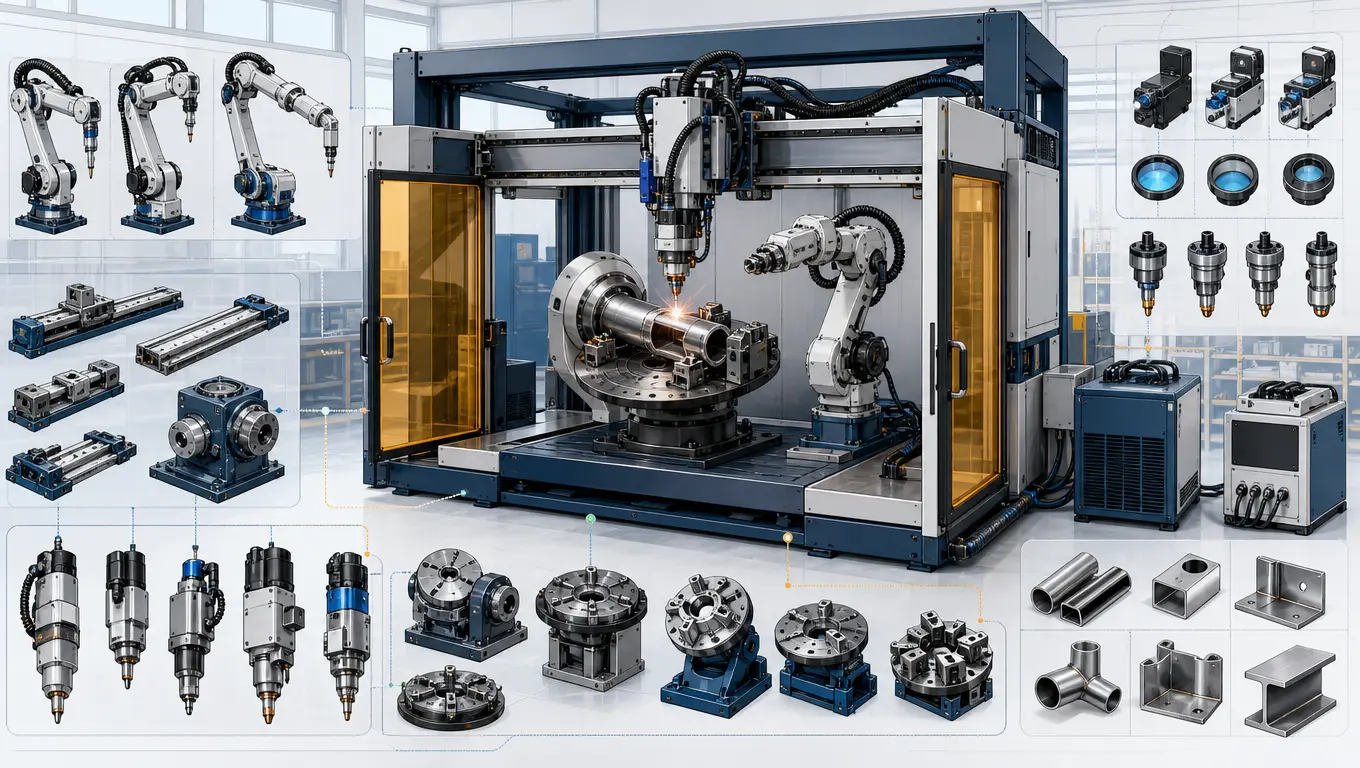
Multi-Axis CNC Laser Welding Workstations: Technical Selection Guide
Manufacturing high-precision medical devices, aerospace components, and electronic enclosures requires repeatable, narrow, and structurally sound joints. Traditional manual welding struggle to meet these strict specifications, driving the adoption of multi-axis CNC laser welding workstations. To implement an automated workstation, engineers must carefully evaluate axis layouts, servo-drive mechanics, and optical paths. This guide provides a step-by-step tutorial on configuring a CNC 3/4/5-axis laser welding machine, helping you match system specifications to your production requirements.
1. Preparation and Workspace Evaluation
Before selecting hardware, define the physical and mechanical requirements of your components. Incorrect axis configurations can lead to dynamic tracking errors, insufficient weld penetration, or mechanical collisions.
Pre-Configuration Technical Checklist
- Part Geometry Mapping: Map the path of the weld seam. Flat, linear, or circular seams in a single plane require less axis complexity than curved, 3D spatial contours.
- Tooling and Clamping Space: Factor in the physical size of pneumatic clamps. The work envelope must accommodate both the parts and their precision customized fixtures without restricting optical clearance.
- Dynamic Accuracy Requirements: Determine the allowable path tolerance. Linear-motor-driven stages offer higher precision (under ±5 microns) than standard ball screw drives, making them ideal for micro-welding applications.
2. Step-by-Step System Selection and Configuration
Follow this systematic process to configure a CNC laser welding workstation tailored to your application:
Step 1: Determine the Axis Layout (3-Axis vs. 4-Axis vs. 5-Axis)
The number of interpolated axes determines the geometric flexibility of the workstation:
- 3-Axis Configuration (X, Y, Z): Uses three orthogonal linear axes. The laser head moves vertically (Z) while the workpiece or gantry moves in the horizontal plane (X, Y). This setup is ideal for flat plates and simple 2D profiles.
- 4-Axis Configuration (X, Y, Z + R-Axis): Adds a rotary axis. By integrating synchronized single-axis rotary positioners, the system can rotate cylindrical parts (such as sensors, motor casings, or tubes) while the laser head performs linear tracking.
- 5-Axis Configuration (X, Y, Z + Tilt/Pan Axes): Incorporates two rotational axes (often a tilting table or a 2-axis tilting laser head). This configuration allows the laser beam to maintain a perpendicular angle relative to complex, curved 3-dimensional surfaces.
Step 2: Select the Fiber Laser Source and Delivery Optics
Select a fiber laser source with a power rating matched to your material thickness (typically 1kW to 3kW). For high-precision applications like electronics or medical devices, single-mode fiber lasers with a small spot size (10-50 microns) provide deep penetration with minimal heat input. Pair the laser with a wobble welding head to help bridge fit-up variations without compromising weld strength.
Step 3: Choose the CNC Controller and Motion Drive
The motion controller coordinates the laser trigger pulses with the physical axis coordinates. To prevent corner burn-through, choose a controller that supports “laser power frequency modulation”—which automatically scales the laser output power relative to the instantaneous velocity of the CNC axes.
Step 4: Design Customized Clamping and Tooling
Because laser welding uses a highly focused beam, maintaining a tight part-to-part fit-up is critical. Design precision customized fixtures using copper or aluminum backing plates. These materials secure the parts and act as heat sinks, rapidly drawing heat away from the weld zone to prevent thermal warping.
Step 5: Enclose the Station and Configure Shielding Gas
Fiber lasers operate at a 1064nm wavelength, which can cause permanent eye damage. Enclose the workstation in a certified Class 1 laser-safe cabinet with interlocked access doors and laser-rated viewing windows. Configure dual shielding gas channels (coaxial for weld-pool protection and back-purge for root protection) to prevent oxidation.
3. Workstation Configuration Matrix
This comparison matrix highlights the capabilities, target applications, and investment levels of various CNC workstation configurations:
| Workstation Type | Motion System Details | Typical Part Target | Path Accuracy | Investment Level |
|---|---|---|---|---|
| 3-Axis Gantry CNC | Linear Ball Screw Stages (X, Y, Z) | Flat sheet metal, linear electronic enclosures, battery pack busbars. | ±0.02 mm | Entry to Mid-Level |
| 4-Axis Rotary CNC | X,Y,Z Linear + Direct-Drive Rotary Positioner | Sensors, cylindrical batteries, medical catheters, circular pipes. | ±0.01 mm | Mid-Level |
| 5-Axis Gantry CNC | X, Y, Z Linear + 2-Axis Tilt/Rotary Table | Hydroformed tubes, complex aerospace casings, automotive components. | ±0.015 mm | High-Level |
| 5-Axis Dual-Drive Linear | Direct-Drive Linear Motors + High-Speed Galvo Head | High-speed micro-welding, semiconductor frames, medical implants. | ±0.005 mm | Premium |
4. Dynamic Accuracy and Path Calibration
To maintain path precision across multi-axis configurations, implement standard calibration procedures during setup:
- Rotary Axis Alignment: Use a dial indicator or laser interferometer to align the centerline of the rotary chuck with the linear travel axes, minimizing runout during rotation.
- Dynamic Tool Center Point (TCP) Calibration: In 5-axis systems, calibrate the rotational pivot centers to ensure the laser focus spot remains fixed on the seam during tilt and rotation moves.
- Closed-Loop Linear Scales: For high-precision applications, install optical linear scales to provide direct position feedback to the CNC controller, compensating for any thermal expansion or mechanical backlash.
Multi Axis Welding Machine: Configurations and When Each Is Worth It
A multi axis welding machine is any system that moves the workpiece, the torch, or both along more than one controlled axis. The configuration determines joint access, and joint access determines whether the process is repeatable at all.
| Configuration | Axes | Typical use |
|---|---|---|
| Rotary positioner | 1–2 | Circular or longitudinal seams presented to a fixed torch. |
| Tilt and rotate table | 2 | Keeping the weld in the flat or horizontal position for heavier sections. |
| Gantry with 3–5 axes | 3–5 | Large or long parts that are easier to move under the head than to rotate. |
| 6-axis robot | 6 | Complex 3D joints and multi-pass work on one fixture. |
| Robot plus positioner | 7–9 combined | Coordinated motion, where the table and robot move together. |
Multi-axis laser beam welding: what the extra axes actually buy
- Path continuity — a seam welded without stopping avoids the start/stop defects that a re-clamped part introduces.
- Beam-to-joint angle control — in laser welding the incidence angle affects coupling and keyhole stability, so presenting the joint consistently matters more than raw axis count.
- Access to hidden joints — axes that reposition the part can replace a second fixture and a second operation.
Selection checklist
| Decide | Because |
|---|---|
| Part moved, torch moved, or both coordinated? | Sets the machine class and the control architecture. |
| Required positional accuracy at the joint | Accumulated axis error shows up directly as seam mismatch. |
| Whether coordinated motion is genuinely needed | It is the single largest cost and commissioning step. |
| Calibration and re-calibration interval | Multi-axis accuracy drifts; the plan for restoring it should exist before purchase. |
5. Frequently Asked Questions
Q: What are the main differences between a 3 axis laser welding machine and a robotic welding arm?
A: A 3-axis CNC gantry uses rigid linear stages, which typically offer higher mechanical stiffness and path accuracy (±0.01mm) over small-to-medium envelopes. Articulated robot arms provide more geometric flexibility and a larger reach but generally operate with a slightly wider path tolerance (±0.05mm to ±0.1mm).
Q: Can an automatic laser welder run both pulse and continuous laser modes?
A: Yes, modern fiber lasers can operate in both Continuous Wave (CW) and Quasi-Continuous Wave (QCW) pulsed modes. QCW pulsed modes are highly effective for heat-sensitive electronic components, as they allow the material to cool between pulses, reducing the heat-affected zone.
Q: Why is shielding gas selection critical for titanium and aluminum alloys?
A: Titanium and aluminum are highly reactive at elevated temperatures. Exposure to oxygen or nitrogen during welding can cause embrittlement and porosity. Using high-purity Argon (99.99%) or Helium shielding gas is essential to isolate the weld pool from atmospheric gases.
6. Conclusion and Custom Workstation Design
Configuring a CNC laser welding workstation requires balancing travel speeds, coordinate flexibility, and mechanical accuracy. Matching the right axis layout with a high-performance fiber laser and secure clamping fixtures is key to achieving consistent, high-quality welds. TrueSyn designs and builds turnkey CNC laser welding workstations tailored to your application’s tolerances and cycle times. Contact our technical team today to discuss your project, run test welds on your parts, or configure a custom system.
Consult with TrueSyn Technical Engineers
Contact us to review your component designs and automation goals:
- Email: wangd@zjcxlaser.com
- WhatsApp (Mr. Peng): +86-13615855016
- WhatsApp (Ms. Wang): +86-13185595609
- Watch our workstations on YouTube: TrueSyn Laser Automation Channel
Multi-Axis Laser Welding Solutions: Matching the Cell to the Seam
Axis count is the cheapest part of multi-axis laser welding solutions; the integration
around the axes is what makes or breaks the cell. A credible solution maps your seam
schedule to four things: motion (axes and positioners), seam tracking, filler and shielding
strategy, and fixturing — then proves the combination on your part before you sign.
| Seam type | Typical configuration | Critical integration piece |
|---|---|---|
| Straight, full-length | Gantry or 6-axis, part fixed | Clamping that does not block the head |
| Circumferential | Robot + 1-axis rotator | Concentricity of part on the rotator |
| Out-of-position / 3D | Robot + 2-axis positioner | Coordinated motion during the weld |
| Variable-gap joints | Any above + seam tracking | Tracker latency vs travel speed |
Evaluation checklist for vendor solutions: a cycle-time simulation on your seam schedule,
not a demo on theirs; sample welds on your material and thickness; the laser-safety file
owned by the integrator; and a stated data handoff (fault codes, energy per seam) if the
cell must report upward. Solutions that skip these four are selling axes, not welds.
Guide index: related reading
- Laser Welding Services — the service page behind every configuration in this guide
- MIG/MAG Welding Robot — a production-ready robot to pair with a multi-axis workstation
- Cobot Welding Systems: When Collaborative Robots Win — the lower-payload alternative to a gantry workstation
- Laser Welding Robots in EV Battery Manufacturing — a high-volume application where 5-axis interpolation pays off
Workstations we build: the FANUC-series laser welding robot for high-volume automated cells, the 3-axis flip positioner for multi-face work, and the water-cooled handheld welder for manual positions the cell cannot reach.